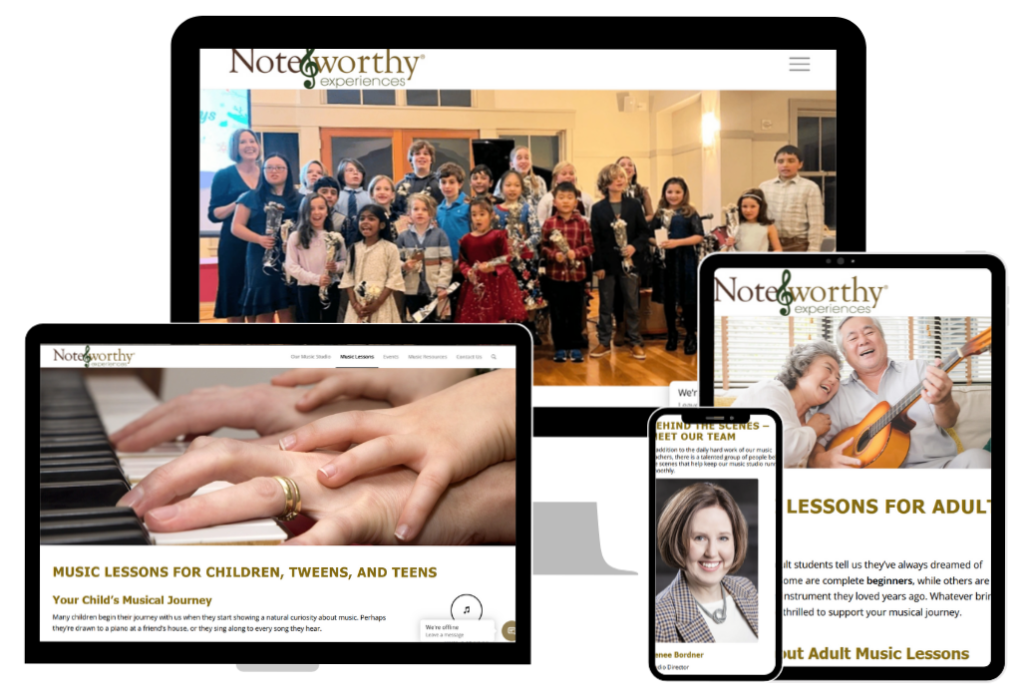
Please join me in congratulating Note-worthy Experiences® Music Studio in Sudbury, MA on the recent launch of their brand new WordPress website.
Renee Border, the music studio’s founder and Director, and I have known each other for several years. She originally hired me to work on SEO projects for her Weebly website.
During one of our SEO status sessions, Renee mentioned that she wanted to enhance her website both technically and visually, and that she also wished she had a more user-friendly backend interface for her and her staff to update page content more easily.
Converting Weebly to WordPress
Feeling that she and staff had reached the boundaries of Weebly’s page-building system, and knowing that I specialize in creating WordPress websites, Renee asked me what it would take to convert the Weebly website to WordPress. I responded that in order to be accurate, I needed to research the conversion tools that were available and take inventory of the components of her existing website in order to get a feel for the size and complexity (expressed in customizations, content, and, images).
The Weebly website consisted of:
- Over 90 blog posts
- Over 175 web pages
- Over 222 images
Originally, we were discussing “converting the Weebly website to WordPress”.
Upon researching, I quickly learned that there was no single tool that would convert from Weebly to WordPress.
In fact, no tools existed that would allow us to even export the Weebly website piece-by-piece (i.e. all the blog posts, all the images, all the web pages, etc.). For the most part, each “object” would need to be handled manually.
The Weebly website was of substantial size, and moving the items one-by-one would be a very time-consuming, costly task, and “new website” had not been a line item in the 2025 budget!
Hybrid WordPress website development plan is born
Renee and I put our heads together to determine how to make it happen within FY 2025. We came up with a hybrid development plan, where I would do the technical things and SEO heavy lifting, while her staff would copy the blog post’s and web page’s content and download the images so that they could be imported (or copy-n-pasted) into the new WordPress version of the website.
Zoom Training
After setting up the WordPress development environment, I met with Renee and staff to introduce them to WordPress, and in particular, to the premium theme they would be using to create blog posts and pages as the website was being built – and that they would continue to use post-launch, on their own, when I had moved on to other projects. We discussed:
- How to create a web page (blog post)
- How to present content in columns
- How to upload images
- How to upload PDFs
- How to create lists
- How to create buttons
- How to include images in web pages and blog posts
- How to display videos stored on YouTube
- How to create links to downloadable files, internal pages, and external websites
- How to name images, pages, and downloadable files for best SEO-earning potential
- How to add basic SEO components to pages, posts, images, downloadables, videos
- and, much more
We met on Zoom so the recording would be (and still is) available online for her and the staff to reference.
With basic WordPress development training behind us, our development collaboration moved forward.
How did we collaborate on developing the website?
We loosely divided up the tasks, and checked in with each other daily so that we remained on the same page.
As I was
- creating the development environment,
- uploading and installing WordPress, plugins, and themes,
- creating custom post types (for teachers, instruments, and interviews),
- writing custom code for special searches that drive the screen presentation of certain pages, and,
- integrating certain forms with their online email marketing tool,
the Note-worthy Experiences staff was
- converting the 222 downloaded images to the current go-to image format WEBP,
- uploading the WEBP images to Media,
- creating shell pages in the development environment, and copying and pasting the content from the existing website into the pages,
- creating shell blog posts in the development environment, and copying and pasting the content from the existing website into the blog posts, and,
- learning how to use the Form creator and creating over 15 forms.
After the shell pages and posts were created, staff and I updated them, replacing the .gif, .jpg, and, .png images with the new WEBP-formatted images. Then we doubled back to Media to remove the images that had been created in the old formats.
One staff person focused on image creation and management of the Chat tool while another focused on screen content and presentation while another focused on mapping new pages and blog posts to original pages and blog posts and tracking the redirect statements we would need upon going live.
All the while, staff members were simultaneously maintaining the existing Weebly website and handling all the social media activity, including image creation and posting on a regular basis. (Incredible, eh?)
We checked in frequently and kept lists of pages and blog posts and tasks in a shared area so that we could each get caught up and stay coordinated.
Team members worked different chunks of hours, so, we rarely ran into each other’s working space.
Email was used as the primary communication tool so that we would have a record of questions and answers, and everyone would be on the same page no matter which piece of the website development was theirs.
It took us months. We got it done. We Celebrate!
New WordPress website soft launched in August 2025!
The website debuted with a soft launch in mid-August 2025.
Since then, staff members have been maintaining it on their own with an occasional question for me.
Now that all the content is present, staff is focusing on making the website even more user-friendly by planting links and clues to help prospects find all that they want to know on their journey to signing themselves/their children up for music lessons.
Me? I’m back on SEO duty, and, creating WordPress websites for others.
Here’s what Renee had to say about working together…

Working with Karen Callahan at Adventures Online was an absolute pleasure. She guided us through the entire process of building our WordPress website with patience, professionalism, and a deep knowledge of both the technical and creative sides of web development.
Karen took the time to understand our goals and translated them into a site that is not only beautiful and user-friendly but also easy for us to update and manage.
Her clear communication and responsiveness made what could have been an overwhelming process feel smooth and even enjoyable.
We are thrilled with the final result and grateful to Karen for bringing our vision to life.
I invite you to visit the Note-worthy Experiences® Music Studio website. And, be sure to go to the Contact page to send a congratulatory note to Renee and the staff.
Website details for the techies like me!
As of October 9, 2025, the website includes:
- 61 flat web pages
- 167 dynamically generated web pages based post type, and the number of dynamic pages scales up and down depending on the quantity of line items defined within each entity
- 91 blog posts
- 3 custom post types
- 3 custom forms for adding and managing Teachers, Instruments, and Special Interviews
- 2 custom page templates
- 300 images
- 17 custom forms, several of which integrate directly with Constant Contact
- JavaScript routines for Ajax screen loads
- Schema files for clearer definition for the AI SEO
- Enfold theme
- Gravity forms
- Constant Contact
Converting your Weebly website to WordPress? Let’s talk!
Visit the brand new Note-worthy Experiences website!
Get WordPress coaching and create your own website!