• Skip to primary navigation
  • Skip to main content
  • Skip to primary sidebar

Adventures Online

WordPress Consulting and Services

  • Home
  • Services
    • SEO Program for High Performers
    • WordPress Coaching
    • SEO Audits
    • WordPress Upgrades Package
    • WordPress Website Development
    • Special Projects: Custom Programming
  • Clients
    • Client Success Stories
  • Blog
  • About
    • Meet Karen Callahan
    • Speaking
  • Contact
    • 508-480-8833
You are here: Home / Blogs / Embedding Video in a WordPress Blog

Embedding Video in a WordPress Blog

May 1, 2010 / /

Instructions for embedding a YouTube video in your WordPress® blog.

  1. View the video in YouTube (or view it in Edit Video if you are logged into YouTube)
  2. Click on Embed (sometimes on the right, sometimes below the video)
  3. Select and Copy the embed code that is displayed
  4. Open the page or post in your WordPress blog where you want to embed the video
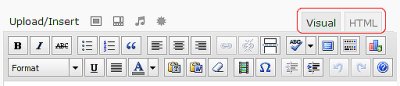
  5. Switch to HMTL view
    WordPress Editing Icons
  6. Paste the code into the content box below the editing icons
  7. Save/Update/Publish the post or page

Filed Under: Blogs

Previous Post: « Adventures Online’s Website on WordPress
Next Post: Tip for Adding Video to a WordPress Blog »

Primary Sidebar

Connect with Karen

  • Email
  • Facebook
  • Instagram
  • LinkedIn

The more you know…

Email(Required)

Copyright © 2026 · Adventures Online · All rights reserved.       Privacy Policy