Limit Login Attempts is THE must-have plugin that every WordPress blogger needs to install TODAY.
Limit Login Attempts does just what its name says; it counts consecutive login attempts and disallows further attempts from a location when the max number of attempts allowed at one time has been reached.
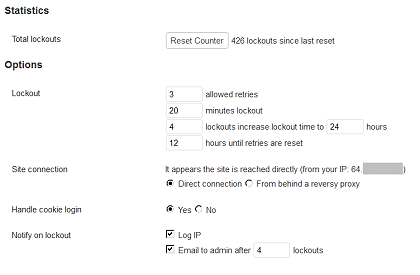
By default WordPress allows unlimited login attempts either through the login page or by sending special cookies. This allows passwords (or hashes) to be brute-force cracked with relative ease.
Limit Login Attempts blocks an Internet address from making further attempts after a specified limit on retries is reached, making a brute-force attack difficult or impossible.
(from the Limit Login Attempts plugin page)
The location is locked out for a period of time (default 20 minutes), and over time, the location is locked out for a longer period of time when other lock-out criteria is met. All of the plugin’s parameters (number of retries, lock-out period of time, notification to admin, etc) are customizable. Above is the Limit Login Attempts admin screen customized for a WordPress power blogger who is the only person who maintains the blog.
How to interpret the Limit Login Attempts admin screen
If this blogger fails to enter a correct username-password combination within 3 tries, the blogger has to wait 20 minutes before attempting to log in again. If the blogger gets locked out 4 times (has made 12 unsuccessful attempts to log in), he/she is locked out for 24 hours. These are more than reasonable parameters because power bloggers tend to know and remember their log-in credentials.
Limit Login Attempts Statistics
Total number of lockouts…Limit Login Attempts has been installed on this WordPress website for a little over a month. You can see that it has already enforced 426 lockouts.
Why do you need this plugin?
Because WordPress is a hackers dream, and you need to protect yourself.
WordPress is open...
WordPress is an open-source software product. Open-source means that the program code is available to everyone in the world, including you – to view, use, tweak, exploit!
WordPress is prolific…
There are about 1 billion websites (watch total number of websites grow). A little over 20% of those are WordPress-based. That’s about 2 hundred million websites. If you are a hacker, you want to make a name for yourself by impacting as many websites as possible. Imagine writing a hack that could affect 200M websites.
Taking security one step further…
When Limit Login Attempts sends a message to the admin (in this case, the power blogger), the blogger sends me the IP address so that I can permanently deny access to the website.
Notes:
– Limit Login Attempts displays a notice with the remaining number of login attempts a user has
– If you get locked out AND you are a client of Adventures Online, call us and we’ll clear the lockout.